Napper: Baby Sleep & Parenting
- 4.6
- Rating
- 1.00M
- Installs
- Free
- Price

 Analysis by App-foxy
When a baby’s sleep changes from one day to the next, even a simple nap can feel like a puzzle. I tried Napper as a parenting app built around sleep tracking, wake windows, nap planning, and calming sounds. My overall impression is that it is most useful when you want guidance between the obvious choices of “put the baby down now” and “wait a little longer,” without turning your day into a spreadsheet.
It is a free app in the parenting category, developed by Napper, with a 4.6 average from around 12 thousand ratings and more than 500 thousand installs. That level of adoption makes sense to me: the app focuses on a very specific daily problem, but it also tries to cover the surrounding routine with baby tracking and sleep audio. It is available for Everyone, runs on Android 7.0 or later, and its current version is 6.39.0.
How Napper fits into a real baby routine
I find Napper most useful when it helps me turn a hazy recollection of the day into one practical next step: whether to begin winding down, keep observing, or revise the plan after a short nap. That makes the routine easier to discuss with another caregiver, too. The next section looks at how I’d use its tracking and sleep guidance without letting a suggested window overrule the baby’s cues.
You May Also Like

 Blood Strike: 2.5 Anniversary
Blood Strike’s Loadouts Turn Every Drop Into a Tactical Gamble
A close look at Blood Strike’s custom loadouts: how fast access to signature weapons reshapes its battle royale rhythm, rewards preparation, and narrows the gap between fights.

 Pandora - Music & Podcasts
Pandora’s Music Is Easy to Start, but Harder to Recover
Pandora’s strength is its low-effort path from a seed to a station. Its weak spot is how much confidence it asks you to place in connection, setup, and quiet recovery.

 8 Ball Pool
 Is Built on Rivalries, Rematches, and Routine
A close look at the rivalries, rematches, shared routines, and unanswered safety questions that turn a quick pool match into a persistent mobile community.

 Samsung Music
’s Quiet Strength Is Playing What You Already Own
Its reach comes less from spectacle than from dependable access to a personal library. That simplicity is both the app’s strongest retention engine and its ceiling.

 AccuWeather: Weather Radar
AccuWeather Review: A Quick, Clear Forecast for Everyday Decisions
For everyday plans, the best forecast is the one you can understand quickly. AccuWeather makes rain timing, radar, and local conditions easy to act on, with a few trade-offs.

 Hill Climb Racing
Why Hill Climb Racing Still Turns Crashes Into One More Run
A tiny car, a bumpy hill and one more upgrade: Hill Climb Racing keeps resurfacing because its simple chaos makes every near-miss feel personal.
More From Our News Desk
View All News


A practical starting point for tired parents
The first thing I noticed is that the app makes more sense when used as a running log rather than a one-time sleep calculator. You record what happened, then use that history to make the next decision. That distinction matters. A schedule printed on paper can look reassuring, but it does not react when a nap is short, a feeding takes longer than expected, or the morning starts unusually early.
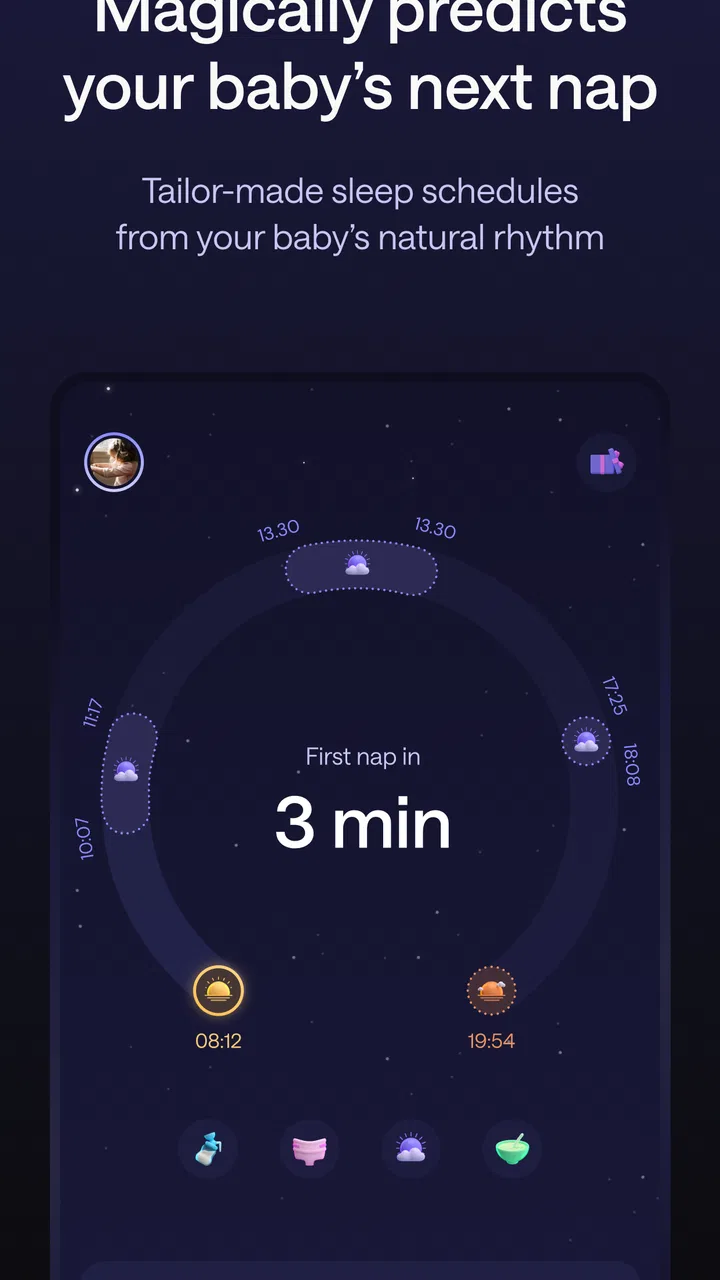
The wake-window approach is the central idea. Instead of treating every day as a fixed timetable, Napper helps you think about the time your baby has been awake since the last sleep. In practice, that gives you a flexible prompt: start watching for tired signs around the suggested period, rather than waiting until the baby is already overtired. I found this more realistic than trying to force identical nap times every day.
That does not mean the recommendations should be treated as medical advice or as a promise that a baby will sleep on command. Babies are not clocks. Growth, illness, travel, feeding, stimulation, and developmental changes can all disrupt a pattern. The best use of the app is as a second opinion for your observations, not as a replacement for them.
What the tracking is genuinely good for
Tracking becomes valuable when you use it to notice patterns that are hard to remember. A tired parent may remember that the night was difficult but forget whether the final nap ended early, whether the baby had a long awake period before bedtime, or whether the previous day was unusually busy. Recording those events gives the next day more context.
One useful workflow is to log sleep as soon as it happens, then check the next suggested window before starting a household task that cannot easily be interrupted. If the recommendation is approaching, you can prepare the room, reduce stimulation, and gather whatever your normal settling routine requires. This is more helpful than opening the app only after fussiness has already peaked.
I also think the tracker can help parents communicate with each other. If two caregivers are sharing the day, a record is easier to hand over than a vague message such as “the baby slept sometime after lunch.” That can reduce duplicated effort and make bedtime decisions less argumentative. The app does not solve every coordination problem, but a shared reference point is useful in a tired household.
Using sleep sounds without making them the whole strategy
The sleep-sound element is a convenient companion to the tracking tools. I would use it as part of a consistent wind-down routine, not as a magic sleep switch. Familiar background audio can help mark the transition from play to rest, especially when the environment is unpredictable, but it should not become the only condition under which a baby can settle.
A sensible approach is to keep the sound at a comfortable level and use it consistently enough that it signals quiet time. I would also avoid changing sounds every few minutes in search of the perfect option. That turns a calming routine into another source of stimulation. The real value here is convenience: the audio is available in the same place as the schedule and log, so you do not need to juggle several unrelated tools.
A realistic day with the app
Imagine a morning that begins earlier than usual. The first nap is shorter than expected, and the baby wakes just as you are preparing breakfast. Rather than keeping the original timetable, I would record the short sleep and look at the next wake window. The app can then serve as a reminder to begin winding down earlier than the usual clock time.
Later, if the second nap is delayed because of an appointment, I would treat the suggested schedule as a guide and adjust the day around the baby’s behavior. The useful sequence is not “the app says sleep now, so sleep must happen now.” It is “the app highlights a likely opportunity, so I can prepare before tiredness becomes a crisis.” That small change in mindset is where I see the strongest practical benefit.
What is free and what may cost extra
Napper is free to download and use at its basic entry point, which makes it easy to test without committing money first. That matters in parenting, where an app can sound perfect in theory but feel too demanding once it becomes part of a busy routine. You can find out whether logging and wake-window guidance fit your family before deciding whether additional access is worthwhile.
There are in-app purchases ranging from $9.99 to $69.99 per item. I would therefore separate the decision into two questions: does the free experience solve enough of your problem, and would the paid options add enough convenience or depth to justify the cost? The price range is wide, so I would read the purchase screen carefully and avoid assuming that every useful tool is included in the free experience.
For me, the free starting point is the strongest part of the value proposition because it lowers the risk of trying the app. Paid access could make sense for a parent who uses the system daily and wants more from the wider toolkit, but it is harder to justify if you only need an occasional nap reminder. A paid upgrade should save mental effort repeatedly; it should not be purchased simply because the family is having one difficult week.
Where the app beats simpler alternatives
The usual alternative is a notes app, a paper notebook, or a basic alarm. Those options are perfectly adequate if all you want is a record of when the baby slept. They can even be better for parents who dislike predictions and prefer to make every decision themselves.
Napper’s advantage is the connection between the record and the next likely sleep period. You are not only collecting times; you are using them to shape the day. The sound tools also keep the routine in one place. In contrast, a notes app requires you to interpret the pattern manually, while an alarm can remind you of a time without understanding what happened earlier.
There is a trade-off, though. A notebook is fast, private, and almost impossible to overcomplicate. An app asks you to open it, enter events accurately, and keep using it consistently. If you find tracking stressful, the extra structure may feel like work rather than support. Napper is better for parents who want guidance from their records, not merely a digital diary.
Important limitations and points of friction
The biggest limitation is that a suggested wake window can create false confidence. If you treat it as a strict rule, you may start ignoring the baby’s actual cues or become frustrated when the predicted nap does not happen. I would use the app to narrow the timing, then let behavior decide the final moment.
Tracking also has a human cost. During a difficult night, remembering to log every sleep period may be unrealistic. Missing entries can make the day look more orderly or more chaotic than it really was. That is not a failure of the app; it is a reminder that the data is only as useful as the routine allows. I would rather record the major sleeps consistently than abandon the app because every small event was not captured perfectly.
Another consideration is that families with very different caregiving styles may not want the same level of structure. One parent may appreciate a prompt, while another may feel judged by it. Agreeing in advance that the recommendations are optional can prevent the tool from becoming a source of tension. The app should support decisions, not win arguments.
I would also be cautious about using any sleep tracker to investigate a health concern. If a baby’s sleep, breathing, feeding, mood, or development is worrying you, a pediatric professional is the right person to consult. A record from the app may help you describe what has been happening, but it should not be used to diagnose a problem.
Small habits that make it more useful
- Log the start and end of sleep promptly when possible, because delayed entries are easier to confuse with feeding, travel, or play times.
- Use the upcoming window as a preparation cue rather than a command. Begin the calming routine before the baby is overtired, but stay flexible if the baby is clearly not ready.
- Review several days together instead of reacting to one unusual nap. A single disrupted day is not necessarily a new pattern.
- Keep the sleep sounds consistent during settling, then avoid changing them repeatedly. The routine matters more than finding a supposedly perfect sound.
- Use the history during caregiver handoffs so the next person understands the day without relying on memory alone.
These habits turn the app from a passive log into a lightweight planning tool. They also reduce one common mistake: opening the app only when the baby is already crying. The earlier you use the information, the more useful the guidance becomes.
Who is likely to get the most value
I would recommend trying it if you are new to wake windows, if naps feel unpredictable, or if you and another caregiver regularly disagree about when to start the next sleep. It is especially suitable for parents who want more structure than a notebook provides but less rigidity than a fixed timetable.
It may also help during transitions, when an old routine stops working and you need to observe the new pattern. In that situation, the tracking history can make changes easier to see. The app is not going to remove the uncertainty, but it can give you a clearer way to respond to it.
The best candidates are parents who can tolerate suggestions without feeling obligated to follow them. If you enjoy checking patterns, preparing ahead, and adjusting plans based on recent sleep, the app has a good chance of becoming part of your daily routine.
Who should probably skip it
I would skip it if you already have a routine that works well and you do not want to record anything. A simple alarm or a paper note may be quicker and less distracting. I would also avoid making it your main tool if predictions make you anxious or if you tend to measure your parenting success by whether the baby follows a schedule.
Families looking for a complete medical, developmental, or feeding-management solution should also look elsewhere or use this only as a small part of their toolkit. Its strength is focused sleep organization. That focus is useful, but it is not the same as covering every parenting need.
My verdict on the free-to-paid decision
After using it as a sleep-planning companion, I see Napper as a thoughtful option for parents who want help interpreting the space between naps. The free access makes the trial decision straightforward: use it during ordinary days, see whether the reminders and tracking actually reduce mental load, and only then consider an in-app purchase.
The paid range from $9.99 to $69.99 per item means I would not recommend upgrading automatically. The right question is whether the extra access provides something you will use repeatedly, rather than whether it contains more features in the abstract. For a family that opens the app every day and benefits from its broader tools, paid value may be reasonable. For occasional use, the free experience or a simple alternative may be enough.
My final recommendation is a cautious yes. Napper is worth trying when you want flexible guidance, not a rigid timetable. Its strongest contribution is helping you prepare for the next sleep while keeping the day adaptable. Its main weakness is the temptation to treat an estimate as an instruction. Used with common sense, the baby’s cues, and realistic expectations, it can make a tiring routine feel more manageable without pretending that infant sleep can be perfectly controlled.
FAQs for Napper: Baby Sleep & Parenting
01What features does Napper: Baby Sleep & Parenting offer to help with baby sleep?
Napper provides a variety of features to assist parents with their baby’s sleep, including customizable sleep schedules, soothing lullabies, white noise options, and sleep tracking. The app also offers personalized tips based on your baby's sleep patterns, helping to establish healthy sleep habits. Users can also log naps and nighttime sleep for detailed insights.
02Is Napper: Baby Sleep & Parenting suitable for first-time parents?
Yes, Napper is ideal for first-time parents as it offers a comprehensive guide on baby sleep patterns and parenting tips. The app provides easy-to-follow advice and educational content designed to help new parents understand their baby's sleep needs. Its user-friendly interface makes it accessible for anyone navigating parenthood for the first time.
03Does Napper require a subscription, and are there any free features?
Napper offers both free and premium features. While you can access basic functionalities like sleep tracking and some soothing sounds for free, a subscription unlocks advanced features like personalized sleep consulting, expanded lullaby libraries, and detailed sleep analytics. This tiered approach allows users to choose a plan that best fits their needs and budget.
04How customizable are the sleep schedules in Napper: Baby Sleep & Parenting?
The sleep schedules in Napper are highly customizable, allowing parents to adapt them according to their baby's unique sleep patterns. The app provides options to set nap times, bedtime routines, and wake-up schedules. It also adjusts recommendations based on the age and developmental stage of your child, ensuring that the advice is relevant and supportive.
05Can Napper be used for older children, or is it only for infants?
While Napper primarily focuses on infants, its features can be adapted for older children as well. The app’s customizable scheduling and soothing sounds can be beneficial for toddlers and even preschoolers. Parents can continue to use the app’s tracking and analytics to monitor changes and improvements in sleep patterns as their child grows.
Pros
- User-friendly interface for ease of navigation.
- Includes a variety of calming lullabies.
- Customizable sleep tracking for babies.
- Expert parenting tips integrated in-app.
- Offline access to key features.
Cons
- Limited free content available.
- Requires registration for full access.
- No multi-language support currently.
- Some features need frequent updates.
- Occasional crashes on older devices.

Napper: Baby Sleep & Parenting
Gallery